 English
 Polski
👥 Community tab
Browse player activity, recent matches, friends, messages and a filterable player list.


Play retro games online with friends across PS2, Dreamcast, Naomi, PSX, System 12 and arcade platforms. Arkadyzja (pronounced /arcadisia/) combines matchmaking, netplay, replays, spectators and community features in one client.
Beta client available for Windows and Linux
Latest news:
Tekken 6 Online on PC with Rollback Netplay 2026-10-21
Tekken 5 DR Online with Rollback Netplay 2026-10-19
Public Beta: play PS2 Games online 2026-10-06
🌐 Read the guide in your language:
Arkadyzja requires VC++ Runtime to be installed.
Arkadyzja is a free matchmaking frontend for PlayStation 2, Dreamcast, Naomi, PSX and arcade games. The Retrobuda client provides a shared netplay flow with accounts, replays, spectators, chat and community features across supported platforms.
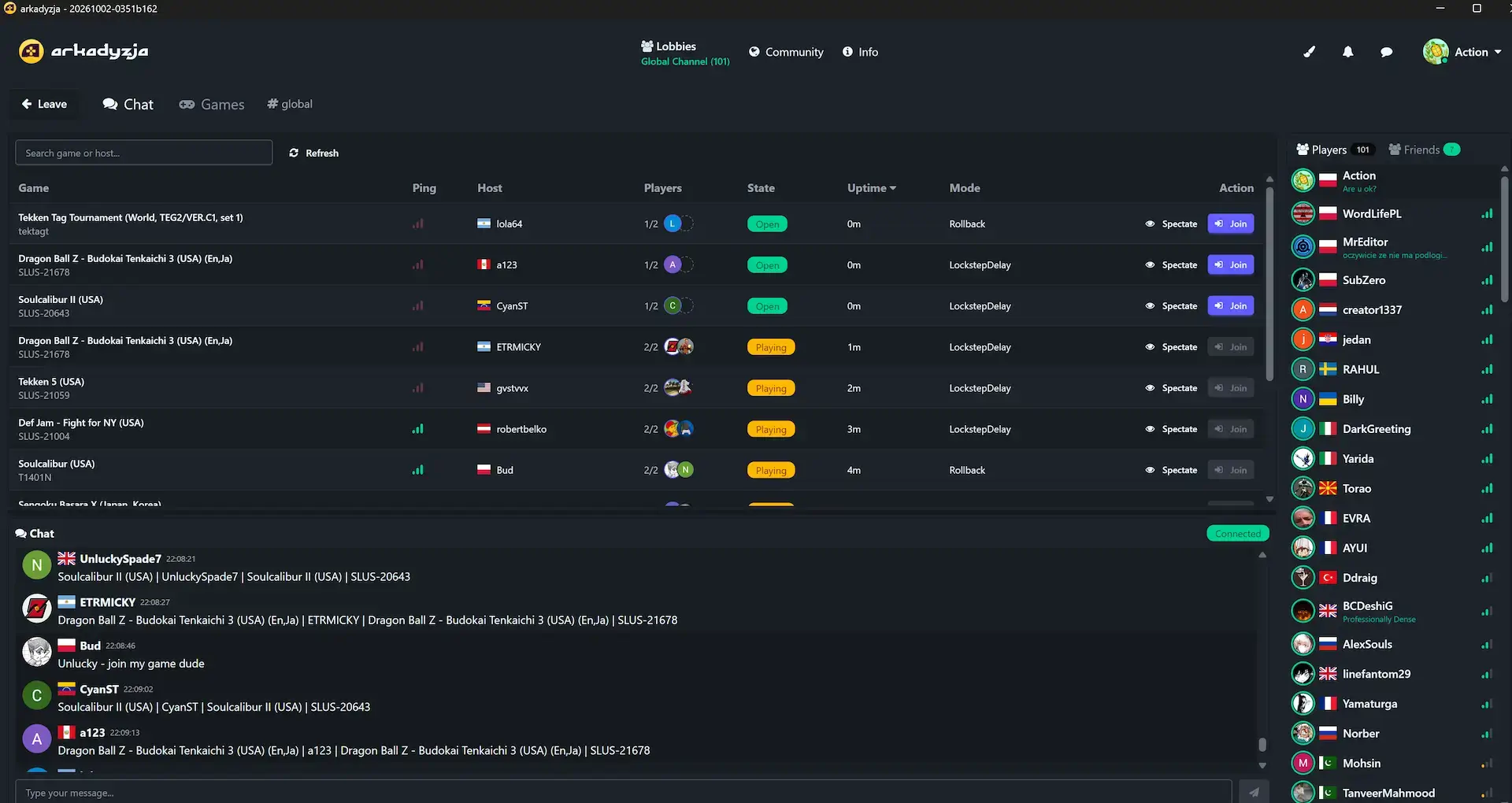
An account is required to use the beta client. Google login is available, and the account system connects matchmaking with player profiles and social features.
Browse player activity, recent matches, friends, messages and a filterable player list.
Find players by activity and the games they play, then contact them directly to arrange a session.
Keep track of players you meet through profiles, friends and match activity.
Every session is recorded and stored on the server. Watch your own games or replays from other players, including 4-8 player sessions.
Arkadyzja uses direct peer-to-peer connections when possible and automatically falls back to a relay server when UDP hole punching fails. This helps players behind CGNAT, mobile networks and other restrictive network setups connect to a session.
Automatic mode selects the closest available relay. A relay can add some latency, but it makes a session possible when a direct connection cannot be established. Two relay servers are currently deployed for testing.
PS2 games use lockstep delay netplay rather than rollback, with reduced default input delay compared with the older PCSX2-netplay approach.
Four-player sessions and even eight-player sessions using two multitaps are supported, with analog controls, spectators and replays.
These platforms share Arkadyzja's common replays, spectator support and multiplayer features. Four-player sessions are supported where a game allows them.
Games can use lockstep delay or full rollback netplay. Dreamcast games retain full analog precision in lockstep mode, while rollback mode remains fully digital.
System 12 runs through the DuckStation core with hardware rendering and netplay performance tuning.
It supports System 12 arcade games with hardware rendering and upscaled presentation.
The beta client is available on Windows and Linux. The main emulator cores use native Linux builds; MAME and FBNeo run through bundled Wine.
Save states created by the Wine-based MAME and FBNeo cores are not cross-compatible and that part of the Linux experience is less stable.
PS2 netplay is available in the beta client for a range of tested fighting, sports and action games.
PS2 netplay uses lockstep delay, not rollback. The reduced default client input delay provides a more responsive experience than the older PCSX2-netplay fork.
Rollback is available for supported Dreamcast, Naomi, PSX and arcade games. Game-specific rollback work for PSP fighters is also part of Arkadyzja's active development.
A PSP-based rollback implementation is in development, with a focus on performance and responsive netplay.
Additional rollback implementations are active development work and require deeper game-specific analysis.
PSP fighters are technically promising rollback candidates, but each game requires its own analysis.
The unified client and shared netcode make it possible to develop support for additional systems and game-specific rollback implementations.
Getting started is simple. Install the Arkadyzja client, sign in with your Google account and configure your controller. The unified setup flow works consistently across supported PlayStation, Dreamcast and arcade platforms, with platform-specific steps such as BIOS setup where necessary.
After setup, use the community features and private chat to find players, then join or create a netplay session. Read the Arkadyzja guide or join the Arkadyzja Discord community.
Arkadyzja does not provide games for download and does not encourage piracy. Do not ask for or share links to games through the Arkadyzja community. To play, use your own legally obtained game files.